
Overview
About Advantech Container Catalog (ACC)
Advantech Container Catalog is a comprehensive collection of ready-to-use, containerized software packages designed to accelerate the development and deployment of Edge AI applications. By offering pre-integrated solutions optimized for embedded hardware, it simplifies the challenges often faced with software and hardware compatibility, especially in GPU/NPU-accelerated environments.
| Feature / Benefit | Description |
|---|---|
| Accelerated Edge AI Development | Ready-to-use containerized solutions for faster prototyping and deployment |
| Hardware Compatible | Reduces hardware and package incompatibility issues |
| GPU/NPU Access Ready | Supports passthrough for efficient hardware acceleration |
| Model Conversion & Optimization | Built-in model conversion and quantization recommendations |
| Optimized for CV & LLM Applications | Optimized stacks for vision and language workloads |
This container, LLM MLC LLM on Qualcomm® Adreno™, delivers an on-device LLM inference stack using the MLC runtime (TVM) with Adreno GPU OpenCL acceleration on Qualcomm® QCS6490™ devices. It includes:
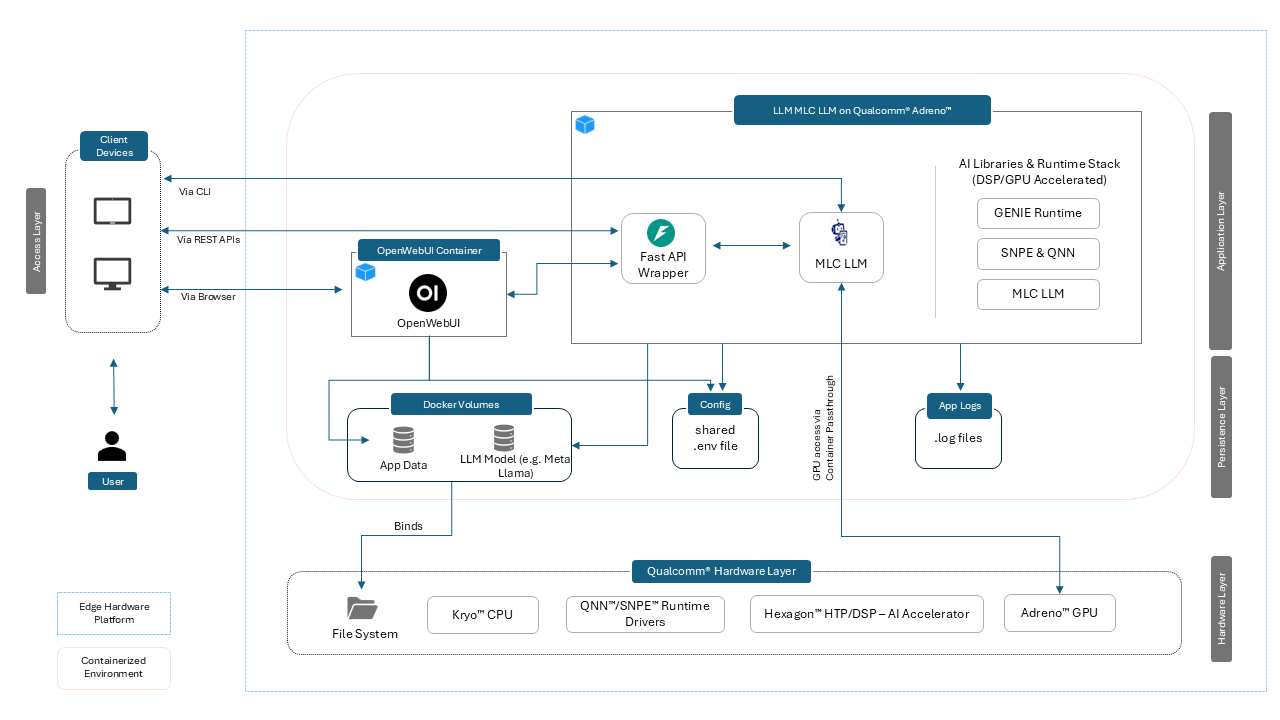
- MLC TVM runtime + compiled model binaries
- FastAPI backend exposing OpenAI-compatible endpoints (
/chat/completions) - Optional OpenWebUI frontend for interactive chat
- Utilities for model conversion, verification (wise-bench), and service management
Use cases: low-latency conversational AI, local inference for privacy-sensitive deployments, and offline-capable edge LLM services.
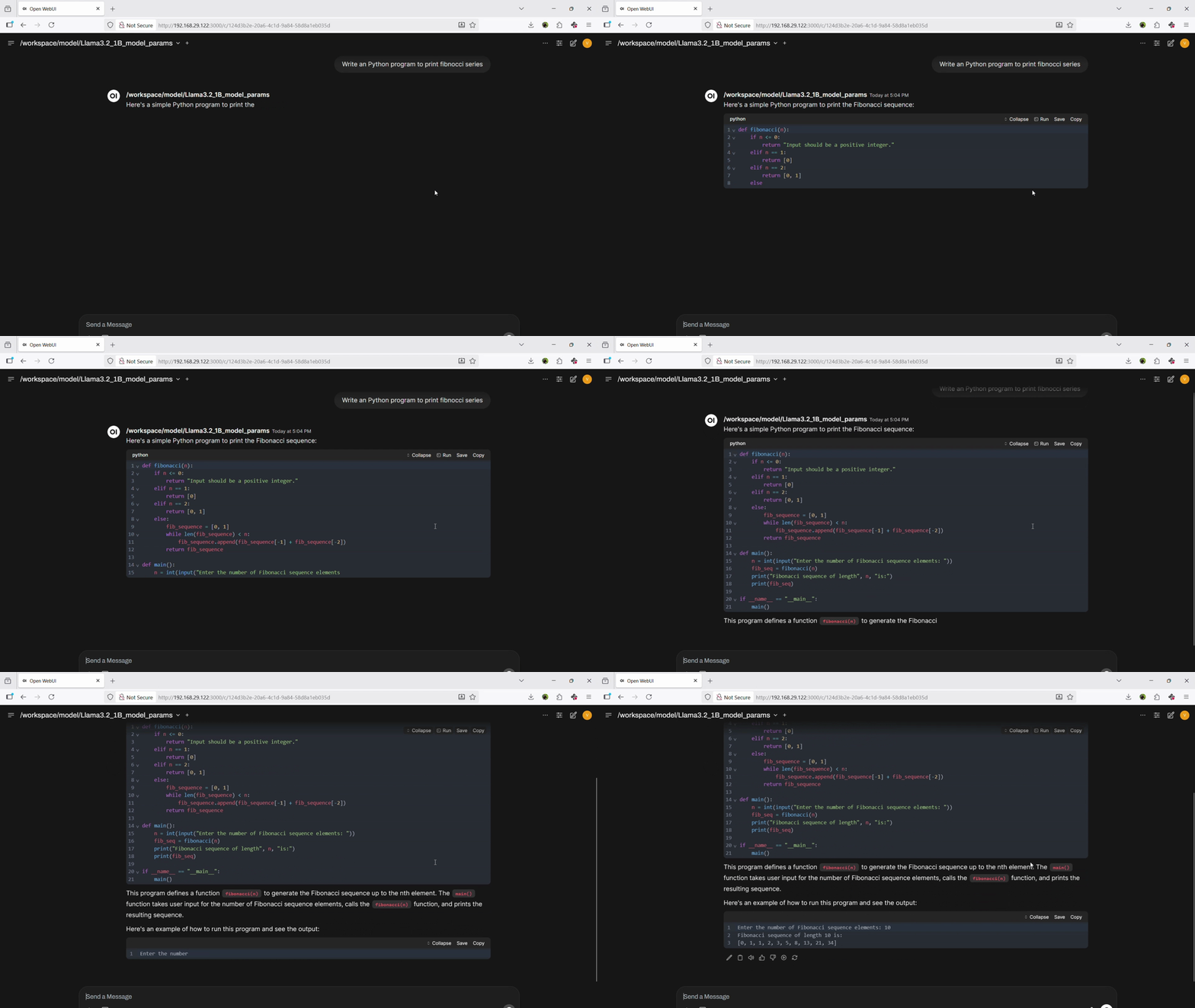
Container Demo
Use Cases
| Use Case | Description |
|---|---|
| Private LLM inference on local devices | Run LLMs entirely on QCS6490 without internet — ideal for privacy-critical and air-gapped environments. |
| Lightweight backend for LLM APIs | Expose local models via FastAPI for LangChain, custom UIs, or automation scripts. |
| Multilingual assistants | Deploy translation, summarization, and conversational agents locally. |
| LLM evaluation and benchmarking | Swap and test quantized models (Q4/Q8) to compare performance, accuracy, and DSP utilization. |
| Custom offline agents | Build agents that interact with local tools (databases, APIs, sensors, MQTT) for edge decision-making. |
| Edge AI for industrial applications | Natural language interfaces, command parsing, and decision-support at the edge. |
| On-device conversational AI for robotics | Low-latency conversational AI optimized for industrial/robotics scenarios. |
| Edge deployments requiring offline inference | Offline, low-latency deployments for constrained connectivity. |
| Privacy-sensitive applications | Deploy where cloud inference is unacceptable; preserves data privacy. |
Key Features
- MLC TVM Runtime: TVM-compiled Llama models for efficient execution
- Adreno (OpenCL) Acceleration: GPU inference via OpenCL backend on Adreno 643
- Hexagon DSP Acceleration: QNN/SNPE support for quantized exec on Hexagon v68
- OpenAI-Compatible API: FastAPI-based
/chat/completionsendpoint - OpenWebUI Integration: Lightweight frontend for real-time chat
- Streaming Output: Token-by-token streaming for responsive UX
- Offline-First: Fully functional without internet after model deployment
- Developer Tools:
mlc_cli_chat,wise-bench.sh, and example configs
Host Device Prerequisites
| Item | Specification |
|---|---|
| Compatible Hardware | Advantech QCS6490-based devices (e.g., AOM-2721) |
| SoC | Qualcomm® QCS6490™ (soc_id-35) |
| GPU | Adreno™ 643 (OpenCL backend supported) |
| DSP/HTP | Hexagon™ 770 v68 with tensor accelerator |
| Memory | 8GB LPDDR5 |
| Host OS | QCOM Robotics Reference Distro with ROS 1.3-ver.1.1 |
| Compatible BSP | Yocto 4.0 (LE1.3) |
Container Environment Overview
Software Components in the Image
| Component | Version | Description |
|---|---|---|
| MLC LLM Runtime | 0.1.dev0 | TVM-compiled runtime for LLM inference |
| Apache TVM | 0.14+ | Model compilation stack |
| Python | 3.10.12 | Runtime for FastAPI and utilities |
| FastAPI | 0.116.1 | OpenAI-compatible API server |
| OpenWebUI | 0.6.5 | Chat UI (optional container) |
| Uvicorn | Latest | ASGI server for FastAPI |
Quick Start Guide
For container quick start, including docker-compose, build scripts, AI inference application source code and more, please refer to Advantech Container Repository
Including:
- Model preparation & coversion Guide
- Installation
- AI Accelerator and Software Stack Verification
- Model Parameters Customization
- Prompt Guidelines
- MLC LLM Logs and Troubleshooting
- MLC LLM CLI Inference Sample
Supported AI Capabilities
LLM Models
| Model Family | Versions | Notes |
|---|---|---|
| Meta Llama 3.2 | 1B, 3B | Converted with MLC TVM (.bin). 1B recommended for QCS6490 8GB configurations |
Model Formats
| Format | Support Level | Notes |
|---|---|---|
MLC .bin |
Full | TVM-compiled format for MLC runtime |
QNN .bin |
Partial | For DSP execution via QNN/SNPE |
SNPE .dlc |
Partial | For Hexagon DSP-specific execution |
Hardware Acceleration Support
| Accelerator | Support Level | Libraries / Notes |
|---|---|---|
| Adreno (OpenCL) | Full | TVM + MLC runtime (OpenCL backend) |
| Hexagon DSP | Partial | QNN / SNPE support on v68 |
Best Practices and Recommendations
Memory Management & Speed (MLC LLM on QCS6490)
- Model Placement: Ensure models are fully loaded into the DSP/HTP memory or GPU VRAM for optimal inference performance.
- Batch Inference: Use batch inference when running multiple requests to improve throughput efficiency.
- Dynamic Memory Offloading: Offload unused models from DSP/HTP/GPU memory when not needed to free up resources for active workloads.
- Quantization Preference: Prefer quantized models (e.g., INT8, Q4F16) to balance speed, memory usage, and accuracy.
- Context Length Tuning: Reduce the maximum context length when possible to minimize memory usage without impacting task quality.
- Token Management: override
max_tokensto avoid unnecessarily long generations that increase latency and memory consumption. - Model Size Guidance: For best performance on QCS6490, use models with ≤3B parameters.
Known Limitations
-
OpenWebUI Dependencies
On the first startup, OpenWebUI installs certain dependencies. These are persisted in the associated Docker volume, so allow some time for this one-time setup to complete before use. -
Model Compilation
Models must be explicitly converted for execution. Always verify the quantization format and device compatibility before running a model. -
Model Size Restrictions
Models larger than 1B parameters may not run efficiently on QCS6490 due to memory constraints. GPU execution is possible but may suffer from latency or thermal throttling. -
Context Length Limitations
Very long context lengths can exceed memory limits, leading to errors or performance degradation. Adjustmax_tokensand context size accordingly. -
Docker Storage Constraints
Running inside Docker containers can quickly consume disk space due to model weights, logs, and cache. Ensure sufficient storage is available on the device. -
Streaming Support
While streaming improves responsiveness, it can cause higher memory pressure if multiple clients are connected simultaneously.
Copyright © Advantech Corporation. All rights reserved.