
Overview
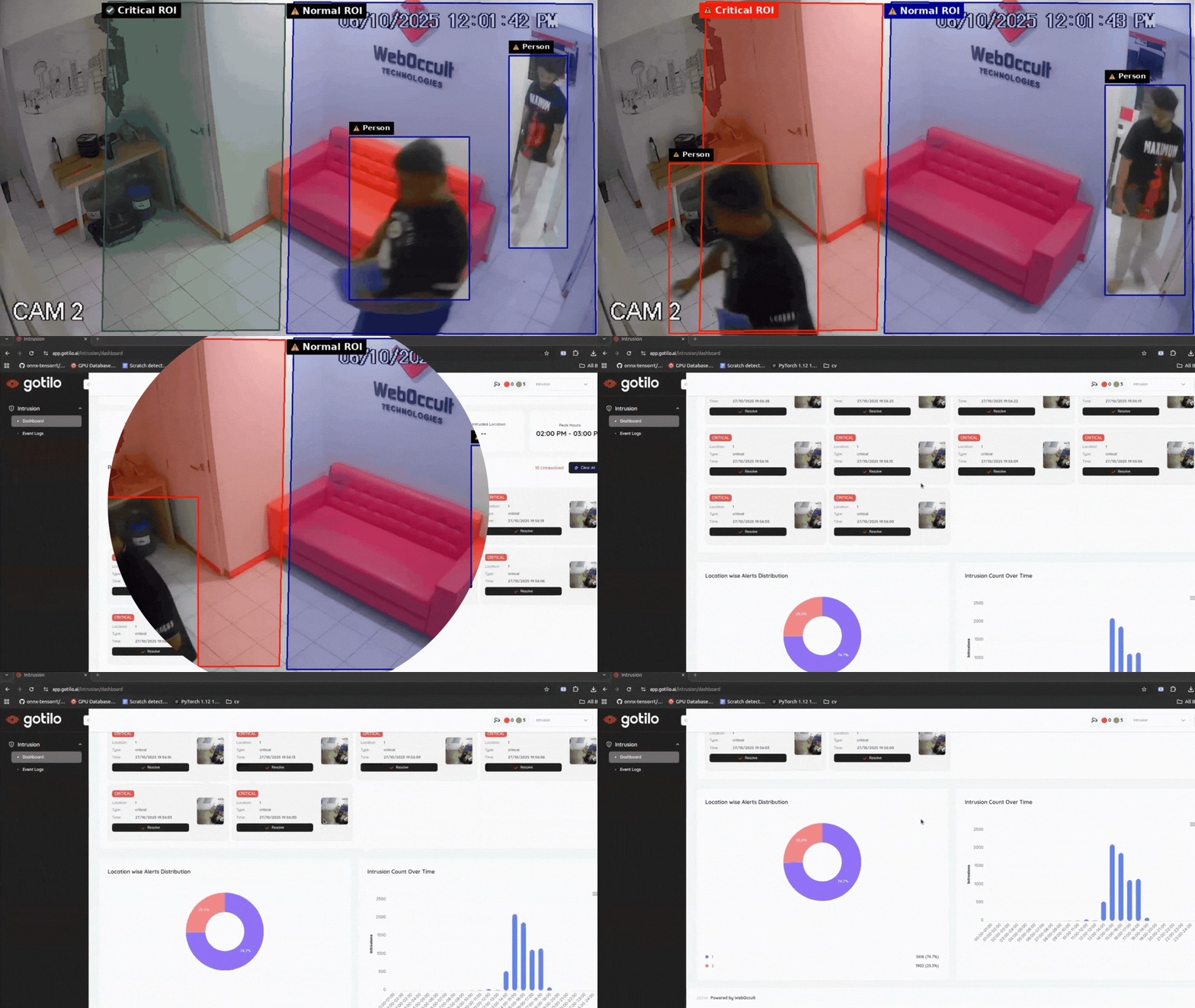
The Weboccult Spot Intrusion Detection System is a container-based AI solution designed to provide real-time monitoring and instant alerts for restricted zones. Built on Advantech’s WEDA environment, it minimizes manual oversight while maximizing security through automated human presence detection.
Container Description
| Field | Details |
|---|---|
| ID / Name | 123 |
| Container Spec Brief | Nvidia Jetson Series + AI Library and Utilities (3 → 1) |
| Supported HW Devices | EPC-R7300, ICAM-540 |
| Chip Vendor / SoC | Nvidia Orin NX |
| Host OS / Container OS | Ubuntu 20.04 |
| BSP | JetPack 5.1.* |
| Pre-installed Software (Container) | CUDA 11.4.315, cuDNN 8.6.0.166, TensorRT 8.5.2.2, ONNX Runtime 1.16.3, OpenCV 4.5 |
| Supported AI Capabilities | Object detection |
| AI Model Formats | Engine, ONNX |
| Acceleration | GPU / CUDA / TensorRT |
| Precision | FP16, FP32 |
| Customer Benefit | Run optimized AI containers on supported hardware with no installation conflicts or dependency mismatches |
| Acceptance Criteria / Quick Validation | GPU visible via top |
Features
- ✅ Real-time human intrusion detection
- 📹 Multi-stream camera handling
- 🚨 Instant alerts for detected intrusions
- ⚡ Optimized AI inference using GPU/CUDA
- 🔧 Supports TensorRT and ONNX model formats
- 🎯 FP16 and FP32 precision for flexible performance
- 🔌 Easy integration with existing camera setups
Application Includes
This application is designed to monitor restricted areas and provide instant alerts to security teams in case of unauthorized access.
Key Use Case
- Objective: Ensure the safety and security of sensitive or restricted areas
- Functionality:
- Continuously monitors designated areas using video feeds
- Detects unauthorized entry or suspicious activity in real-time
- Sends immediate alerts to the security team for quick action
- Users: Security personnel, facility managers, or monitoring staff
This system helps organizations enhance security, reduce response time, and prevent unauthorized access to sensitive areas.
Architecture
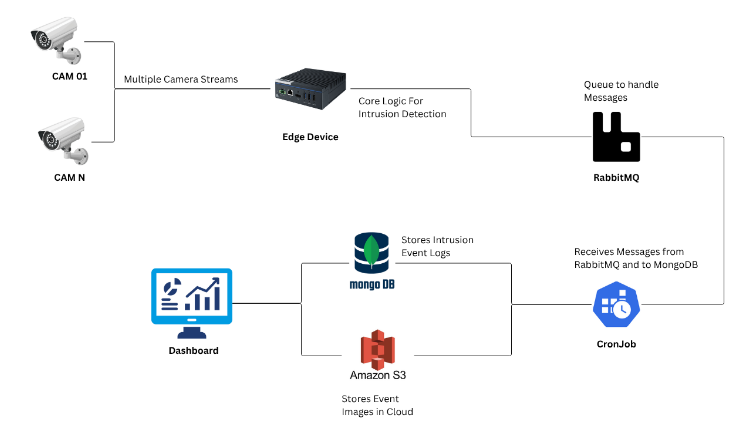
You can see the architecture diagram
User Account Setup & Document Submission
To use the Gotilo Spot Intrusion Detection system, you need a user account and an authentication token. Follow these steps:
Step 1: Download & Fill the Document
Access the document here: Click Here
Fill in the required details.
Step 2: Submit the Document
Send the completed document to the support email: sales@weboccult.com
Step 3: Account Setup & Token
Our support team will help you create your account and generate a unique token to connect your system with the Gotilo Spot platform.
Step 4: Start Using the System
Once your account and token are set up, you can start using the intrusion detection system.
Environment Requirements
Host Environment
- OS: Linux
Docker Setup
Ensure Docker is installed on your Jetson device. The following versions are recommended:
- Docker Engine: v20.10.x or later
- docker-compose: v1.28.x or later
Check if Docker is Installed
Run the following command to verify Docker installation:
sudo docker --version
If Docker is not installed, follow these steps:
- Set Up Docker's APT Repository
sudo apt-get update
sudo apt-get install ca-certificates curl
sudo install -m 0755 -d /etc/apt/keyrings
sudo curl -fsSL https://download.docker.com/linux/ubuntu/gpg -o /etc/apt/keyrings/docker.asc
sudo chmod a+r /etc/apt/keyrings/docker.asc
Add the Docker repository to your APT sources:
echo "deb [arch=$(dpkg --print-architecture) signed-by=/etc/apt/keyrings/docker.asc] https://download.docker.com/linux/ubuntu \
$(. /etc/os-release && echo "${UBUNTU_CODENAME:-$VERSION_CODENAME}") stable" | \
sudo tee /etc/apt/sources.list.d/docker.list > /dev/null
sudo apt-get update
- Install Docker Packages
sudo apt-get install docker-ce docker-ce-cli containerd.io docker-buildx-plugin docker-compose-plugin
- Verify Docker Service Check if Docker is running:
sudo systemctl status docker
Run Docker Without sudo
To allow the current user to execute Docker commands without using sudo:
- Add User to Docker Group
sudo groupadd docker       # Create the docker group if it doesn't exist
sudo usermod -aG docker $USER
- Apply Group Changes
newgrp docker
- Verify User
echo $USER
- Update Docker Socket Permissions
sudo chmod 666 /var/run/docker.sock
After this, you should be able to run Docker commands without sudo. You may need to log out and log back in for the changes to take effect.
Installation Requirements
L1-01 Container Requirements
- Nvidia Jetson Orin or higher series Edge Devices
Supported Device
This System is designed to run on edge devices and work with existing camera infrastructure.
Hardware Requirements
- Edge Devices: NVIDIA Jetson Orin or Higher series
- Supported Advantech Devices: EPC-R7300, ICAM-540 (IIoT & EIoT series)
- GPU Acceleration: NVIDIA GPU with CUDA support
Repository Structure
.
├── resources/
│   ├── HLD-diagram.png
│   ├── ACCA_How_to_run.mp4
│   └── ...
├── docker-compose.yaml         # Docker Compose configuration for service setup
├── run.sh                      # Shell script to run or deploy the project
└── README.md                   # Project documentation (you are here)
Quick Start / Installation
Follow these steps to set up and run the project: Github Repository for Quick Start
Application Usage
Example to run
Watch the short demo video:
- Direct link: resources/ACCA_How_to_run.mp4 ▶️
Functionality:
- Continuously monitors designated areas using live video feeds
- Difference between two levels of intrusion zones:
- Critical ROI (Danger Zone): Alerts are sent more frequently and faster, as this region represents a high-risk or dangerous area
- Normal ROI (Warning Zone): Alerts are sent less frequently, indicating a potential but non-critical intrusion
Troubleshooting
For common issues and solutions, please refer to the troubleshooting section or contact support at sales@weboccult.com.
Future Work
The system can be further enhanced to improve video compatibility, detection accuracy, performance, and monitoring capabilities:
- 🎥 Enable broader video format compatibility and streaming using FFmpeg support
- 🎯 Improve model accuracy and reliability through enhanced person detection
- ⚡ Optimize performance by implementing multiprocessing for parallel detection and processing
- ⏰ Introduce timed intrusion detection to monitor intrusions within specific time intervals
- 🎯 Support multiple regions of interest (ROIs) for more granular alert management
- 🔧 Refine code and processing pipeline for faster and more efficient operation
License
Copyright © Weboccult Technologies. All rights reserved.